Child pages
A list of the pages inside a folder, each one a link. It's made for a folder's own page, the one that opens when you click the folder's name in the sidebar (Finding your way around): put this block there and the folder has a front page that lists what's in it.
The list is read from your vault every time the page is drawn. Add a document, move one or rename one, and the list already shows it.
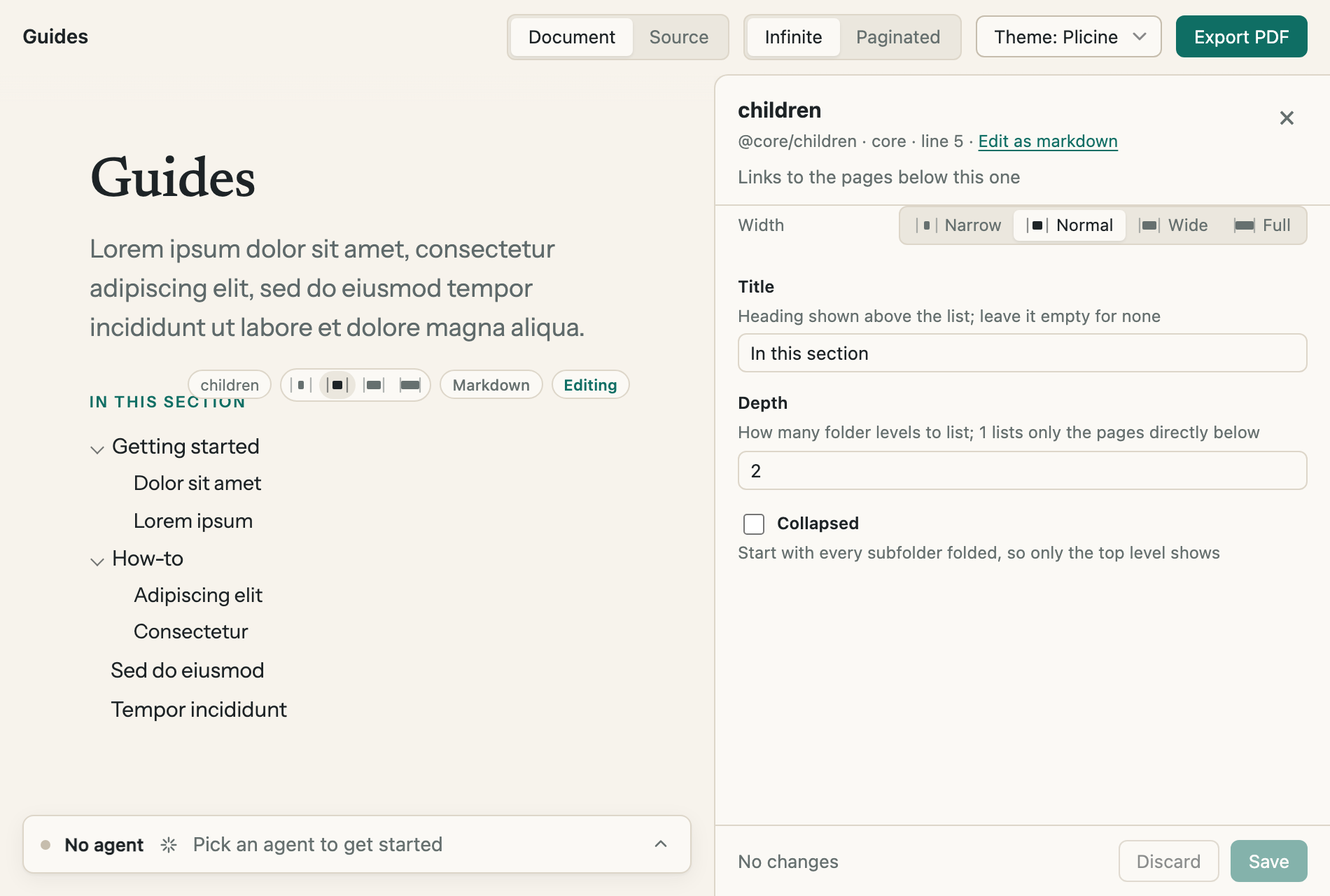
The Guides folder's page. Subfolders come first, as they do in the sidebar, and the arrow in front of one folds it away.
What it lists
| Where the block is | What it lists |
|---|---|
| A folder's own page | Everything in that folder |
| The vault's own page, behind the vault's name at the top of the sidebar | Your whole vault |
| Any other document | The folder next to it with the same name: a document called "Plans" lists what's in a folder called "Plans". With no such folder, the block says "No pages below this one yet" |
Every row is a link. A document opens, and a subfolder opens its own page, which is blank until somebody writes on it. A subfolder goes by the heading on its page when it has one, and by the folder's name when it doesn't.
Adding one
Type / at the start of an empty line and pick Child pages, or use Add block between two things on the page (Adding a block). It goes in listing only what's directly inside the folder, under the title "Pages".
Its options
Click the list, away from its links, and its form opens at the side. In the infinite layout, Edit on the toolbar over the block does the same.
| Option | What it does |
|---|---|
| Title | The small heading over the list. It starts as "Pages". Empty it and the list has no heading |
| Depth | How many levels of folders to list, from 1 to 6. 1, the starting value, lists only what's directly inside. 2 also lists what's inside each subfolder, and so on |
| Collapsed | Starts with every subfolder folded, so only the top level shows until somebody clicks an arrow. It only matters when Depth is 2 or more |
| Width | Narrow, Normal, Wide or Full, as for every block |
In a PDF
Paper can't be clicked open, so a PDF and the paginated layout show every level, whatever Collapsed says.
For technical readers: Core blocks has the block as it's written in the file.